
 stagionShow control for animatronics and stage
Lights, robots, props.
One show.
For shows, animatronics and installations that mix lights with robots and props. Patch them all the same way, build routines without code and run the whole show from one browser.
Illustration · one cue list, lights and motion in sync
Less setup, more show.
Shows now mix lights with robots, props and sensors. Stagion patches them all the same way: describe what is connected and what it may do, instead of coding each device. Per-device limits and a watchdog are built in, because robots are not lights.
Describe it, don't code it
Boards get their pins and limits from the host. No firmware to write per prop.
Set up from a browser
Changes are validated and applied live. Reconfigure on site without reflashing.
Keep your console
Lighting stays on your grandMA or other desk. Stagion takes Art-Net or sACN in and runs the robots, props and sensors alongside it; PLCs and ROS 2 too.
From a box of hardware to a running show
Patch it
Add fixtures, servos and props as components with channels and limits.
Let the device configure itself
Pins and limits go to the board automatically. No per-board code.
Build scenes and shows
Compose scenes and string them into a show, for light and motion alike.
Tweak it live
Adjust everything in the browser on site, applied live.
Behaviour built from blocks
Drag a trigger onto the canvas, wire actions after it and feed them numbers and colours. Routines run on the stagion.edge inside the robot or prop, so it reacts on its own, even when no show is running.


Live: the Routines view of stagion.edge, rebuilt from the console's own styles. Click a block to see its settings, drag the canvas to look around; the timeline below shows three routines running at once.
26 blocks in four groups
Triggers, actions, logic and values. A button, a sensor crossing a threshold, a time of day or a face appearing on camera can start a routine.
Every chain runs on its own
A light effect, an idle motion and a button can all run at the same time. A Wait hands the time back to the others.
Operators still win
Routines rank below the show and manual control. Module limits apply, and STOP cancels every chain.
One controller, as many devices as the show needs
Every robot or prop gets its own edge, every edge its own boards. Select a part to see where it sits.
Built for things that move and glow
Performing robots
Robots and lights in one show, with an operator able to take over.
Animatronics and props
A prop that keeps itself safe and can react on its own.
Interactive installations
Fixtures, motors and sensors in one patch.
Mixed, legacy systems
Drive what you have directly, add new hardware step by step.
Desk, show and autonomy on one device, sorted for you
A show, a camera routine and someone with a slider can all drive the same device. The highest-priority live source wins, and safety always has the last word. Try it.
20015010050Interactive illustration of the priority model, not live device data. Limits are set per channel on the board.
Sources, by priority
Manual beats controller beats show beats autonomy. Routines can never override an operator.
Merge, then safety
Highest live source wins per channel group. STOP sits above everything.
Limits on the board
The board enforces limits and safe state, and reports its health back.
In development, tested on a real robot
The RE-BOT E1 from Epic Impact is the test bed for the whole chain.
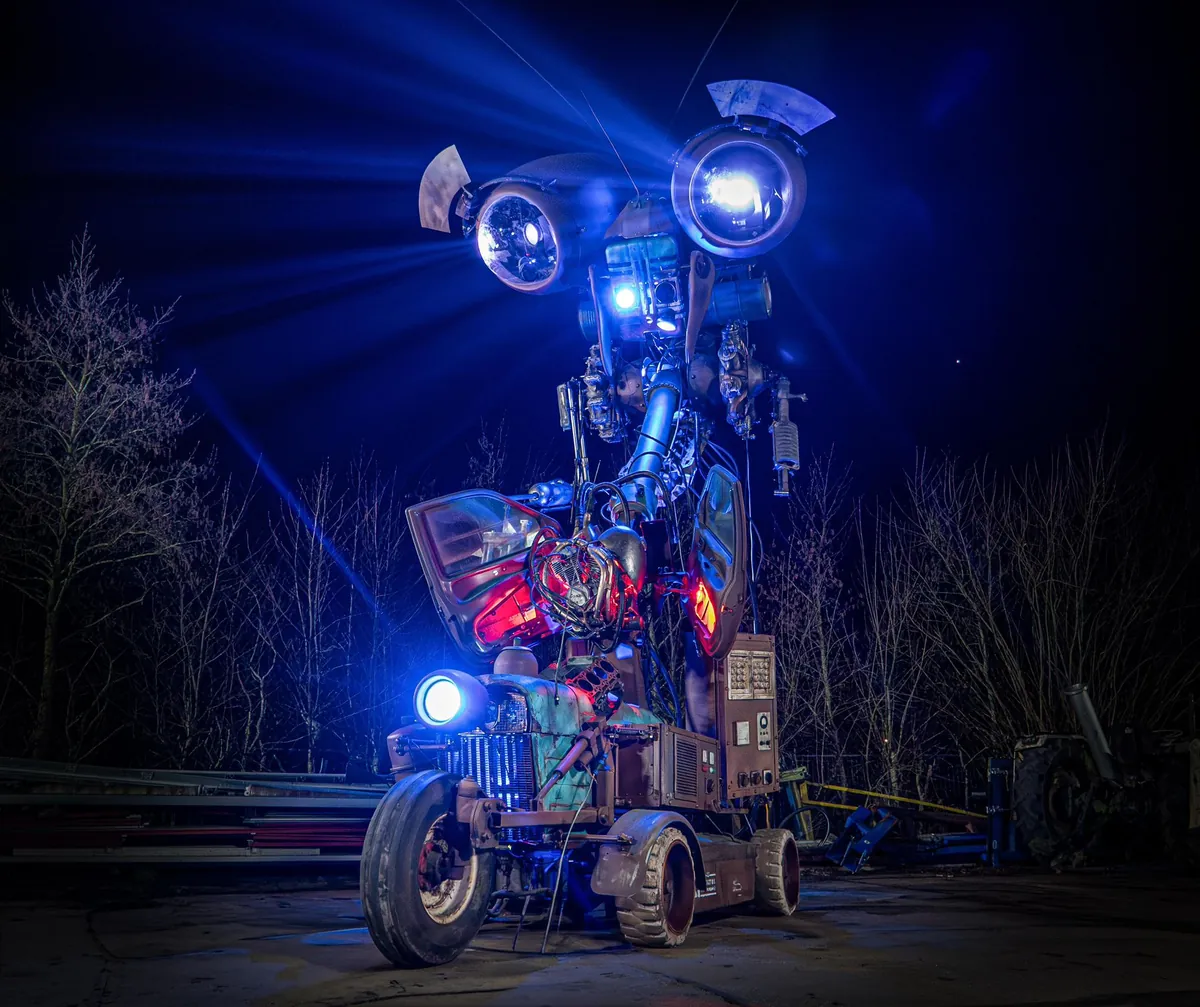
Working now
The full chain from controller to servos, browser setup, priority merge, safety, Art-Net input and patch export.
Planned
A show player that runs shows on the device itself. Pilots with partners are under way.
Frequently asked
Ask me directly about Stagion. You'll usually hear back within two working days.
Ask a questionCan I use Stagion alongside my lighting console?
Yes. Lighting stays on your desk; Stagion takes Art-Net in and handles the robots, props and sensors.
Which hardware does it support?
Common microcontroller boards (the ESP32, for example), bus servos, DMX fixtures over Art-Net, sACN or USB, and PLCs.
What happens if the network drops?
A watchdog moves each board to its safe state on its own. Emergency stops and certification remain the integrator's responsibility.
Is it available as a product?
It is in development and being trialled with partners. Pilots are possible now.
Have a show, robot or prop in mind?
Describe it and get a straight answer on whether Stagion fits.